
HubSpot knows exactly who closed which deals. It just won’t tell you what to pay them in commissions. This limitation forces teams to export the deal list, paste it into a spreadsheet, and run the math there each time with a little help from some formulas. The workaround is technically functional, but it sucks up your time and relies on the spreadsheet formulas not breaking.
Turn HubSpot deal data into per-rep payouts — automatically. Define your comp rules once and BlinkMetrics applies them to every closed deal:
- Tiers, thresholds, product bonuses, and quota rules applied to your HubSpot deals
- Per-rep payout amounts in a live dashboard, refreshed automatically as new deals close
- No monthly spreadsheet, no VLOOKUP breakage, no dedicated ICM platform
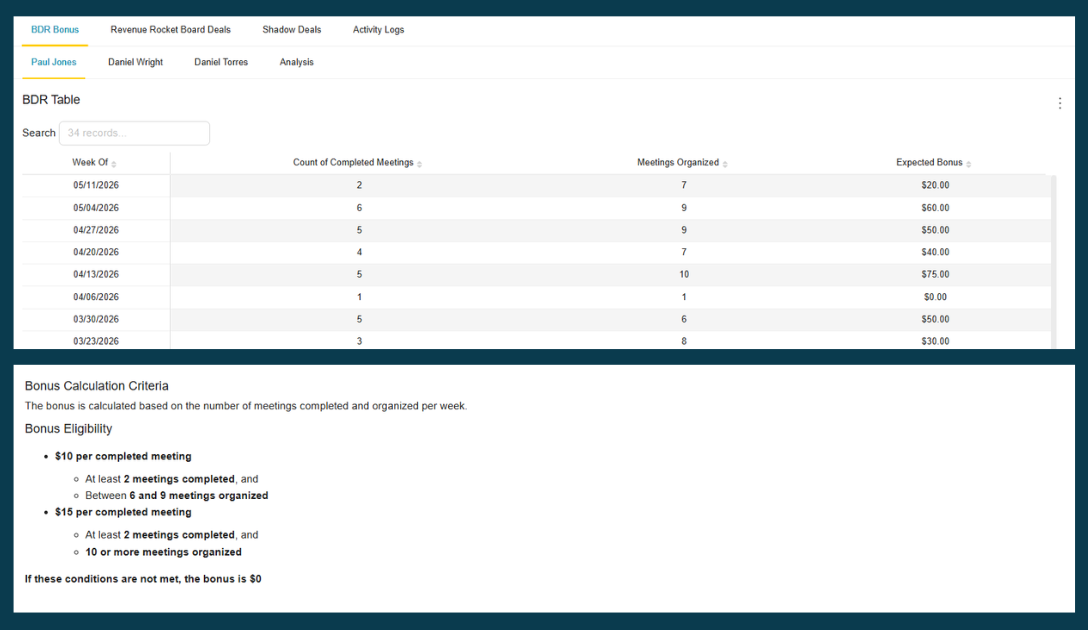
→ See your commission payouts calculated from HubSpot — book a 1:1 with our founder, Nathan
Incentive compensation management doesn’t have to run on spreadsheets. The rest of this post breaks down what HubSpot gives you natively, where the spreadsheet workaround breaks, and what the automated approach looks like.
What incentive compensation management actually involves
Incentive compensation management (ICM) is the process of defining bonus and commission rules and applying them to deal outcomes. ICM typically has three components:
- Defining the rules: Who qualifies for what, under what conditions (quota thresholds, deal size tiers, product mix, new vs. existing accounts)
- Pulling the data: Getting deal outcomes from HubSpot: closed deals, amounts, reps, close dates
- Running the calculation: Applying the rules to the data and producing a payout amount per rep
Enterprise companies use platforms like Xactly or CaptivateIQ that integrate directly with their CRM and automate this. For smaller teams, the same process happens in Excel or Google Sheets, and a lot of the work is the data prep, not the calculation itself.
The gap for HubSpot users is that step two (pulling the data) requires a manual export, and step three (the calculation) has to happen manually somewhere outside of HubSpot. There’s no native comp plan configuration or bonus calculator.
What HubSpot provides natively
HubSpot does give you meaningful raw deal data to work with:
- Deal amount: The value of each closed deal
- Close date: When the deal was marked Closed Won
- Rep ownership: Which user owns each deal
- Pipeline and stage: Which pipeline the deal was in, and what stage it moved through
You can filter deals by rep and time period and build simple reports that show total deal value per rep over a given month or quarter. For a straightforward commission structure where every rep earns a flat percentage of what they close, a HubSpot report handles most of your needs.
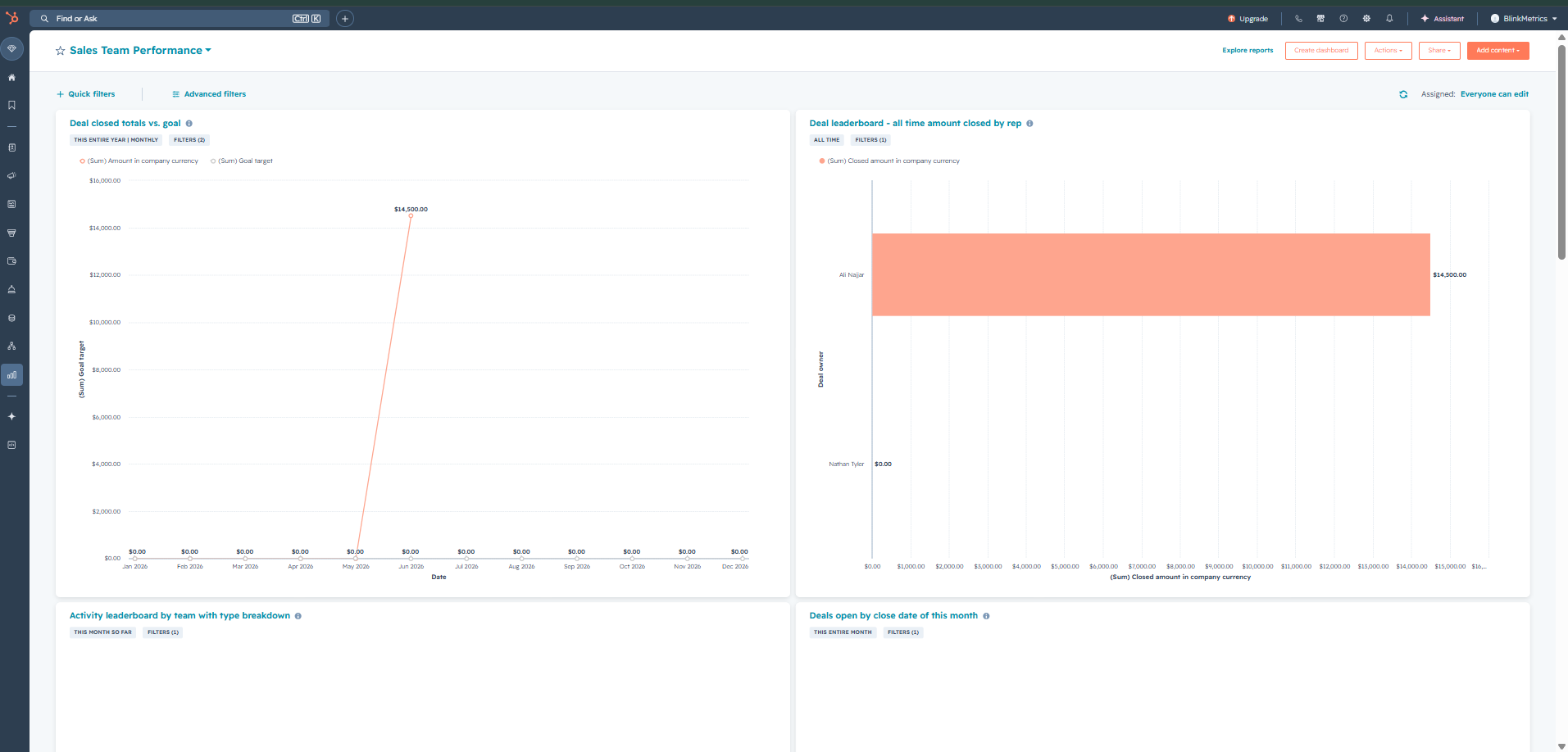
Where HubSpot breaks down is with conditional logic. There’s no way to say, “apply a 5% rate to deals under $10k and a 7% rate to deals above,” or “add a 10% bonus for deals that include Product X,” or “calculate payout only for reps who hit 80% of quota.” The calculation has to happen outside HubSpot, either in a spreadsheet or a dedicated tool.
The spreadsheet workaround (and where it breaks)
For teams with two or three reps, a spreadsheet works fine. You can handle calculations something like this:
- Export closed deals from HubSpot for the period
- Paste the export into a template spreadsheet
- Apply formulas (VLOOKUP or IF statements) that map each deal to the appropriate commission rate
- Sum payout amounts per rep
- Review for errors and edge cases
- Share results with reps
At five or ten reps, this process gets harder to maintain. Formulas break when a new product tier is added. A deal gets excluded because the date filter was off by one day. A rep disputes a payout because they saw a different number in HubSpot. Someone edits the formula column accidentally.
The calculation itself is usually not the hard part. The harder part is getting clean data into the spreadsheet consistently, keeping the template in sync with whatever the current comp plan says, and scaling as the business grows.
What bonus rules you can build from HubSpot data
The criteria you can use to define bonus eligibility depend on what deal properties your team tracks in HubSpot. Common structures that work well:
| Criteria type | Example |
|---|---|
| Deal amount threshold | Standard rate below $10k; accelerated rate above |
| Quota attainment | Payout at 100% of quota; 1.5x multiplier above 120% |
| Product mix | Bonus for deals including a specific product or service |
| Deal type | Different rates for new logos vs. expansion/renewal |
| Close date window | Qualifying deals must close within the calendar quarter |
| Rep subset | Bonus applies only to reps on the enterprise team |
HubSpot stores all of this as deal properties or associated contact/company properties, which means a reporting tool with access to your HubSpot data can apply any combination of these conditions.
The one thing that requires additional work is quota data: HubSpot doesn’t have a native quota tracking field, so you’d either set targets manually in the reporting tool or track quota attainment in a HubSpot custom field. Both approaches work; they just require an extra setup step.
How to calculate bonuses automatically from HubSpot deal data
A reporting tool that connects to HubSpot and reads deal data directly removes most of the manual steps. Instead of exporting and re-importing every cycle, you define your bonus rules once and the calculation runs automatically as deals close. Your reporting dashboard displays the payout amounts for each rep without any recurring work from you.
The basic setup:
- Connect the tool to your HubSpot workspace
- Define your bonus criteria: which deal properties matter, what the thresholds are, which reps are included
- The tool filters deals against those criteria, calculates payout amounts for each qualifying rep, and displays those values in a live dashboard
At BlinkMetrics, we built a bonus payout dashboard view specifically for this use case. You define the criteria (stage, amount range, close date window, rep). We build your done-for-you dashboard that shows which reps qualify and for how much. Your dashboard is updated automatically on a regular schedule giving you fresh data as new deals close.
This is different from a full ICM platform in a few ways. Xactly and CaptivateIQ require a separate data integration, licensing for multiple users, and significant configuration time. They’re built for enterprise sales orgs with complex hierarchical plans. For a team of 5–15 reps with a straightforward comp structure, that overhead doesn’t make sense. A reporting tool that reads directly from HubSpot can produce the same output with far less setup. Plus you get other advanced HubSpot reporting solutions like shadow deals and historical pipeline snapshots included. You can also bring in blended data by connecting to time tracking and other tools that are part of your business.
Want to see this HubSpot bonus calculation in action? Pick a date and time.
Frequently asked questions
Does HubSpot have built-in commission tracking?
No. HubSpot stores deal data (amounts, close dates, rep ownership) but there’s no native engine for defining commission rules or calculating payout amounts. Sales teams typically export HubSpot deal data and run commission calculations in a separate spreadsheet or dedicated ICM software.
What is ICM software and who uses it?
ICM stands for incentive compensation management. ICM software helps sales leaders define commission and bonus rules, apply those rules to actual sales outcomes, and calculate payout amounts per rep. Enterprise tools like Xactly, CaptivateIQ, and Everstage are built for large sales organizations with complex plan structures. For smaller teams, reporting tools that connect to HubSpot directly can handle similar calculations with less setup overhead.
Can I calculate sales bonuses from HubSpot deal data without buying a separate ICM platform?
Yes. If your comp plan is based on deal amounts, close dates, rep ownership, and other standard HubSpot deal properties, a reporting tool that reads your HubSpot data can apply your bonus criteria and calculate payouts automatically. The main limitation is quota data, which HubSpot doesn’t track natively, but you can add this as a custom field or track it in the reporting tool.
How do I know which reps earned a bonus this month in HubSpot?
HubSpot can show you each rep’s total closed deal value for a time period, but it can’t apply conditional logic (thresholds, tiers, product rules) or calculate payout amounts. To know who qualifies and for how much, you need to either export deal data and run the calculation in a spreadsheet, or use a reporting tool like BlinkMetrics that applies your criteria automatically and shows payout results per rep.
What’s the difference between ICM software and a CRM?
A CRM like HubSpot manages your customer and deal data: tracking contacts, deals, activities, and pipeline. ICM software takes that deal data and applies compensation rules to produce payout calculations. They’re different functions. Some teams use a dedicated ICM platform that integrates with their CRM; others use a reporting tool that reads CRM data and handles the calculation logic directly.