

Pipedrive tracks every deal your team wins: the deal value, the owner, the close date, the pipeline stage. But Pipedrive commission tracking ends there. There’s no way to define commission tiers, apply bonus rules, or calculate what each rep actually earned. Most teams end up exporting deals to a spreadsheet and rebuilding the math from scratch every pay period.
A reporting layer on top of Pipedrive can close that gap. You define your bonus rules once, and the calculation runs automatically against your deal data as deals move to won.
Turn Pipedrive deal data into per-rep payouts — automatically. Define your comp rules once and BlinkMetrics applies them to every won deal:
- Tiers, thresholds, product bonuses, and quota rules applied to your Pipedrive deals
- Per-rep payout amounts in a live dashboard, refreshed as deals move to won
- No monthly spreadsheet, no broken VLOOKUPs, no dedicated commission platform
→ See your Pipedrive commission payouts calculated automatically — book a 1:1 with our founder, Nathan
Calculating commissions and bonuses doesn’t require a dedicated ICM tool. It requires deal data, rules, and a reporting layer that can apply both. BlinkMetrics’ Pipedrive reporting ships a payout dashboard view that takes your tier and threshold rules and shows who qualifies and for how much, refreshed automatically as new deals close. The rest of this post breaks down what Pipedrive gives you natively, where the spreadsheet workaround breaks, and what the automated approach looks like.
Why Pipedrive’s Insights tab isn’t enough for commission tracking
Pipedrive’s built-in reporting module, Insights, gives you useful revenue views:
- Deal revenue by owner: Total won deal value per rep over a time period
- Won deals over time: Trend lines showing close volume by week or month
- Pipeline performance: Conversion rates from stage to stage
- Deal duration: Average time from creation to close
For a flat-rate commission plan where every rep earns the same percentage of what they close, Insights gets you most of the way. You can filter by owner, set a date range, and read the total.
Where Insights falls short is conditional logic. You cannot:
- Apply different rates based on deal size (5% under $10k, 8% above)
- Add a bonus multiplier for deals that include a specific product or service
- Calculate payouts only for reps who hit a quota threshold
- Split credit between two reps on a shared deal
- Show individual payout amounts next to deal totals
Insights shows what closed and who closed it. It does not show who earned what. That gap is the problem.
The spreadsheet workaround (and when it stops working)
For a team of two or three reps with a simple comp plan, a spreadsheet is fine. The process typically looks like this:
- Export won deals from Pipedrive for the pay period
- Paste the export into a commission template
- Apply formulas (IF statements, VLOOKUP) to map each deal to the right rate
- Sum payout amounts per rep
- Review for errors, share with reps
This works until it doesn’t. Common breaking points:
| Problem | What happens |
|---|---|
| New rate tier added mid-quarter | Formulas need manual updates; old deals may get recalculated incorrectly |
| Date filter off by one day | A deal gets excluded or double-counted |
| Rep disputes a number | You spend 30 minutes tracing a single deal through the spreadsheet |
| Someone edits a formula cell | The whole sheet breaks silently |
| Team grows past 5 reps | Template maintenance takes longer than the actual calculation |
The calculation itself is usually straightforward. The hard part is getting clean deal data into the spreadsheet consistently and keeping the template current with whatever the comp plan says this quarter.
How to automate Pipedrive commission tracking with a reporting tool
A reporting tool that connects to Pipedrive and reads deal data in real time removes most of the manual steps. Instead of exporting and re-importing every cycle, you define your bonus criteria once and the tool calculates payouts as deals close.
The basic setup:
- Connect to your Pipedrive account. The reporting tool pulls deal data directly, including deal value, owner, close date, pipeline, and any custom fields you use.
- Define your bonus criteria. Which deal fields matter? What are the thresholds? Which reps are included?
- The tool applies the rules. It filters won deals against your criteria and calculates a payout amount for each qualifying rep.
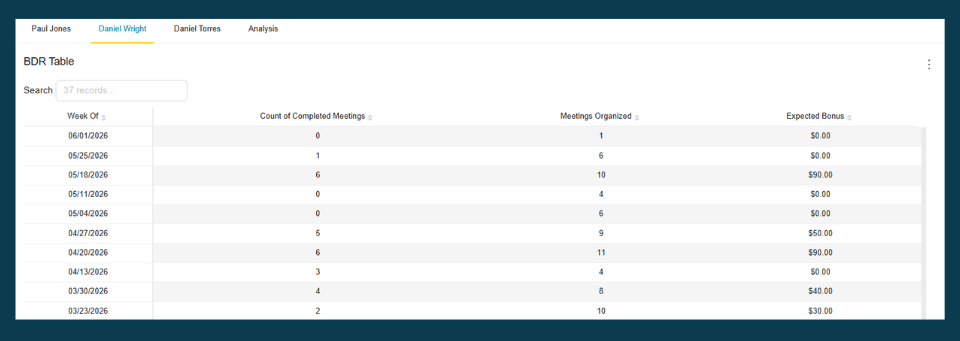
At BlinkMetrics, we built a bonus payout view for exactly this use case. You set the criteria (won stage, deal value range, close date window, owner), and the dashboard shows which reps qualify and for how much. It updates automatically as new deals close in Pipedrive.
Want to see this with your own data? Schedule a strategy session to get started.
What bonus rules you can build from Pipedrive deal data
The rules you can define depend on what deal fields your team actually uses in Pipedrive. Here are common structures that map well to Pipedrive data:
| Criteria type | How it works in Pipedrive |
|---|---|
| Deal value threshold | Standard rate below $10k; accelerated rate above (uses the deal value field) |
| Quota attainment | Payout only when a rep’s total won deals exceed a target amount |
| Product or service type | Bonus for deals tagged with a specific product (requires a custom field or label) |
| Deal type | Different rates for new business vs. upsell (uses a custom field or pipeline) |
| Close date window | Only deals marked won within the calendar quarter qualify |
| Rep subset | Bonus applies only to reps on a specific team or in a specific pipeline |
Pipedrive’s custom fields are flexible enough to support most of these. If your team tracks deal type, product category, or lead source as custom fields, a reporting tool with Pipedrive access can use those fields as bonus criteria.
One thing that requires extra setup: quota data. Pipedrive doesn’t have a native quota tracking feature. You can either set quota targets manually in the reporting tool or track them in a Pipedrive custom field. Both approaches work.
What about dedicated commission software?
There are dedicated commission tools that integrate with Pipedrive and handle complex commission plans with hierarchical structures, SPIFs, and multi-currency payouts. If your sales org has 50+ reps and a comp plan that changes quarterly with accelerators, clawbacks, and manager overrides, those tools earn their cost.
For a team of 3 to 15 reps with a straightforward comp structure (flat rate, tiered rates, or a quarterly bonus threshold), that level of tooling is overkill. A reporting tool that reads directly from Pipedrive produces the same output with less setup and no additional per-rep licensing.
Keeping bonus data accurate as deals change
One risk with any automated commission calculation: deals change after they’re marked won. A deal value gets corrected. A deal gets reassigned to a different rep. A customer cancels within 30 days and the deal should be excluded.
A few ways to handle this:
- Use Pipedrive’s won date as the source of truth. Filter by the date the deal moved to the won stage, not the date it was created.
- Set a lock date. After commissions are finalized for a period, stop recalculating. Any corrections apply to the next period.
- Track deal value changes. If your reporting tool snapshots deal data, you can see when a value changed and whether it affected a payout.
- Exclude deals below a minimum threshold. Small test deals or placeholder entries can skew calculations if they’re not filtered out.
Pipedrive’s activity log shows when a deal was edited and by whom, which helps when a rep questions a payout. Having that audit trail available alongside the bonus calculation saves time during disputes.
Automate your Pipedrive commission payouts
Define your tiers, thresholds, and product rules once. BlinkMetrics applies them to every closed deal and shows payout amounts per rep, with no monthly spreadsheet, no manual reconciliation, no payout errors. See how BlinkMetrics works with Pipedrive, or book a 30-minute walkthrough and we’ll show you a live payout dashboard built from your Pipedrive data.
Frequently asked questions
Does Pipedrive have built-in commission tracking?
No. Pipedrive stores deal data (values, close dates, owners, custom fields) and its Insights module can show revenue totals per rep. But there’s no native way to define commission rules, apply tiered rates, or calculate payout amounts. Teams typically export deal data and run the calculation in a spreadsheet or external tool.
Can I use Pipedrive Insights for commission tracking and payouts?
Insights can show total won deal value by rep for a given period, which is enough for a flat-rate commission structure. It cannot apply conditional logic like tiered rates, quota thresholds, or product-based bonuses. For anything beyond a single flat percentage, you need a separate calculation layer.
What’s the difference between commission software and a reporting tool for Pipedrive?
Dedicated commission platforms (QuotaPath, Everstage, CaptivateIQ) are built for complex, enterprise-scale comp plans with features like hierarchical plan management, approval workflows, and rep-facing dashboards. A reporting tool like BlinkMetrics connects to Pipedrive, applies your bonus rules to deal data, and calculates payouts. For teams with straightforward comp plans, a reporting tool handles the job with less overhead and cost.
How do I handle mid-quarter comp plan changes in Pipedrive?
If your commission rates change partway through a quarter, you need to split the calculation: apply the old rate to deals closed before the change date and the new rate to deals closed after. In a spreadsheet, this means maintaining two formula sets. In a reporting tool, you update the criteria with a date boundary and both rates apply automatically.
Can I track quota attainment in Pipedrive?
Not natively. Pipedrive has a revenue forecast feature and sales goals, but these don’t connect to commission calculations. To track quota attainment for bonus purposes, you can create a custom field in Pipedrive for each rep’s target, or set targets directly in your reporting tool. Either way, the quota data has to be entered manually since Pipedrive doesn’t generate it from deal data.