

Your Pipedrive sales cycle looks fast because some of your deals were never in the pipeline while they were being worked. A rep closes a deal after two months of calls and emails, then creates the deal record in Pipedrive on the day it closes. The deal creation date says last Tuesday, March 31st. The actual relationship started in January. Your average sales cycle drops by weeks, and every metric built on that timeline is wrong.
This is the shadow deal problem, and it’s the most common Pipedrive deal data quality issue. Pipedrive’s simplicity makes it particularly easy to miss.
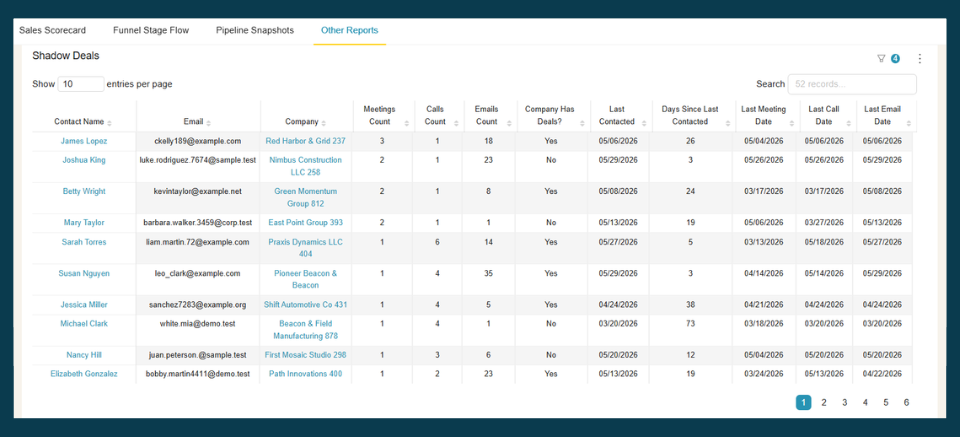
Spot the shadow deals in your Pipedrive pipeline — without the manual audit. BlinkMetrics compares every deal’s creation date against the earliest activity on the associated person, so late-logged deals surface on their own:
- Flags won deals whose contact activity (calls, emails, meetings) predates the deal’s creation date by a meaningful margin
- Shows the gap between when engagement actually started and when the deal was created, so you can set an accurate start date
- Ranks high-activity persons at deal-having organizations, so you know which deals to check first
→ See which of your Pipedrive deals are shadow deals — book a 1:1 with our founder, Nathan
The fix isn’t chasing down every late-logged deal manually. It’s surfacing the signals that flag a shadow deal in the first place. BlinkMetrics’ Pipedrive reporting cross-references contact activity against deal records so the patterns become visible without manual review. Here’s how shadow deals happen, what they corrupt in your numbers, and how to fix the underlying habit.
What is a shadow deal?
A shadow deal is a deal created in Pipedrive at or near the point it was won, bypassing the pipeline stages the rep actually worked through. The deal record exists, the revenue is counted, but the timeline is fiction.
Shadow deals share a few traits:
- Short creation-to-close gap. The deal was created days before (or the same day as) being marked won.
- Missing stage progression. The deal jumps from the first stage to Closed Won with no time spent in intermediate stages.
- Activity history that predates the deal. Calls, emails, and meetings logged against the contact started weeks or months before the deal was created.
The deal looks normal in your pipeline view. It only becomes suspicious when you compare the deal creation date against the activity record.
Why Pipedrive makes this easy to do (and hard to catch)
Pipedrive is built around speed. Creating a deal takes a few clicks. There’s no mandatory field validation that forces reps to log deals at first contact, and no system-level check that compares deal creation dates against existing Activities.
That speed is a feature for most workflows. But it also means a rep can create a deal, drag it straight to Won, and move on in under 30 seconds. Pipedrive won’t flag this or ask questions.
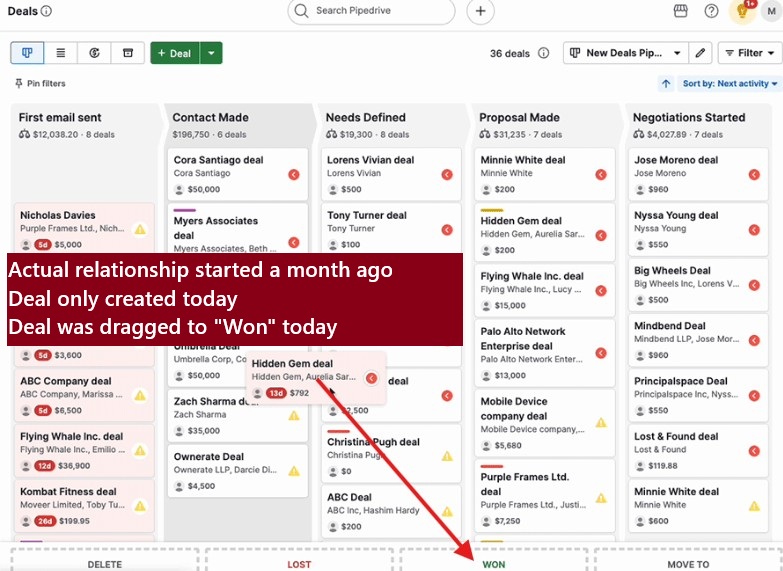
A few Pipedrive-specific factors make shadow deals more common:
- Deal creation is frictionless. The same simplicity that makes Pipedrive popular means there’s nothing stopping a rep from logging a deal only when they’re ready to mark it won.
- Activities live separately from deals. Pipedrive tracks calls, emails, and meetings as Activities tied to contacts and organizations, not just deals. A rep can have months of Activity history on a contact without ever creating a deal record.
- No required pipeline entry trigger. Unless you’ve set up a workflow automation to create deals from specific events, deal creation is entirely manual and voluntary.
What about Rotting and Stale deals?
Pipedrive has built-in features for flagging deals that stop progressing. Rotting deals highlight records that haven’t moved between stages within a set timeframe. Stale deals surface records sitting idle too long.
Both of these catch deals that entered the pipeline and then stalled. They do not catch deals that were never entered in the first place. A shadow deal doesn’t rot because it was never in the pipeline long enough to trigger the timer. By the time it appears, it’s already won.
This is an important distinction. Rotting and Stale deal markers solve a different problem: pipeline hygiene for active deals. Shadow deals are a data entry problem, not a pipeline velocity problem.
How shadow deals hurt Pipedrive deal data quality
The damage shows up across every metric that relies on deal timelines.
| Metric | How shadow deals distort it |
|---|---|
| Average sales cycle | Deals logged at close pull the average down significantly. A handful of shadow deals can shorten your reported cycle by weeks. |
| Stage conversion rates | Shadow deals skip intermediate stages entirely, inflating your conversion rates from early to late stages. |
| Pipeline forecasting | Forecasts built on artificially short cycles and inflated conversion rates overestimate close probability and underestimate time to close. |
| Rep performance comparisons | Reps who log late look faster and more efficient. Reps who log on time look slower because their timelines are accurate. |
| Cohort analysis | A deal worked throughout Q1 but created in Q2 shows up in the Q2 cohort, skewing both periods. |
If 20% of your Closed Won deals are shadow deals, your reported average sales cycle could be off by 30% or more. That number compounds into every forecast and capacity plan you build from it.
How to find shadow deals in Pipedrive
Pipedrive’s list view makes the deal creation date visible by default, which gives you a starting point that some other CRMs don’t offer as readily.
Step 1: Filter for short creation-to-close gaps
Create a filter in Pipedrive’s deal list view:
- Status: Won
- Sort by deal creation date
Look for deals where the creation date is within 7 to 14 days of the won date. These are your candidates.
Step 2: Cross-reference against Activities
For each candidate deal, open the associated contact or organization record and check the Activity history. You’re looking for calls, emails, or meetings that predate the deal creation date.
If a contact has logged Activities going back three months but the deal was created last week, that deal was almost certainly logged late.
Step 3: Check for skipped stages
Review the deal’s stage history. In Pipedrive, you can see when a deal moved between stages. Shadow deals typically show one of two patterns:
- Created directly in the final stage before Won
- Created in the first stage and moved to Won within hours
Either pattern, combined with a short creation-to-close gap, is a strong signal.
The problem with manual auditing
This process works for spot checks. It does not scale. If you have 50 or more Closed Won deals per quarter, manually cross-referencing each deal’s creation date against contact Activities becomes a significant time investment. And you’ll miss deals where the rep’s communication happened outside of Pipedrive entirely (personal email, phone calls not logged as Activities).
How BlinkMetrics flags shadow deals automatically
BlinkMetrics connects to your Pipedrive account and compares deal creation dates against the earliest Activity dates on associated contacts. Where Activity history predates deal creation by a meaningful margin, BlinkMetrics flags the deal, so you can estimate a “true start date” based on when engagement actually began.
The output gives you:
- A list of likely shadow deals with the gap between Activity start and deal creation
- Activity details about each deal (last call date, last email date, meetings list, etc.)
This doesn’t edit your Pipedrive records (that still requires manual updates to deal properties), but it shows you which of your reported numbers likely differ from reality.
Want to see which of your Pipedrive deals might be shadow deals? Watch the shadow deal identifier in action.
How to prevent shadow deals and protect Pipedrive deal data quality
Fixing the data is half the problem. The other half is changing the behavior that creates shadow deals.
Process changes that reduce late deal logging
- Require deal creation at first qualified meeting. Make it a team standard: if you’ve had a real conversation with a prospect, create the deal. Not after the proposal. Not after the verbal yes.
- Add a low-friction first stage. A stage like “Initial Contact” or “First Meeting” gives reps somewhere to put early deals without committing to a full pipeline entry. Lower friction means higher compliance.
- Include deal creation date in weekly reviews. When managers can see that a rep’s deals are consistently created within days of being won, it becomes a coaching conversation, not just a data quality issue.
- Set up Pipedrive workflow automations. You can create automations that generate a deal when certain conditions are met (like a meeting being scheduled with a new contact). This removes the manual step entirely for some deal types.
Fixing existing shadow deals
For historical data, you have two options:
- Edit the deal creation date. Pipedrive allows you to update deal properties, including creation date (although not creation time). If you know when the relationship actually started (based on Activity history), you can backdate the record.
- Add a custom field for “estimated start date.” This preserves the original creation date for audit purposes while giving you a more accurate date for reporting. Less disruptive, and you keep both data points.
You don’t need to fix every historical shadow deal. Start with the last two quarters of Closed Won deals and focus on the ones with the largest gap between creation and Activity start. Those have the biggest impact on your averages.
Stop letting shadow deals distort your Pipedrive numbers
BlinkMetrics surfaces high-activity contacts at deal-having organizations so your team can spot late-logged deals before they wreck velocity, conversion, and forecast metrics. See how BlinkMetrics works with Pipedrive, or book a 30-minute walkthrough and we’ll show you what shadow deals look like inside your own Pipedrive pipeline.
Frequently asked questions
What is a shadow deal in Pipedrive?
A shadow deal is a deal record created in Pipedrive at or near the time it was won, rather than when the sales relationship actually started. The deal’s creation date doesn’t reflect reality, which means any metric based on deal timelines (sales cycle length, stage conversion rates, pipeline velocity) will be inaccurate. Shadow deals are common in teams where CRM logging isn’t enforced at first contact.
Does Pipedrive detect deals that were logged late?
No. Pipedrive’s Rotting deals and Stale deals features flag deals that stop moving through the pipeline, but they don’t identify deals that were never entered until close. There’s no native feature that compares deal creation dates against contact Activity history to surface late-logged deals.
Why is my Pipedrive sales cycle shorter than expected?
If your reported average sales cycle is significantly shorter than what your team experiences in practice, shadow deals are a likely cause. Deals logged at or near close compress the timeline to days instead of weeks or months. Even a small number of shadow deals can pull the average down substantially, especially for teams with fewer than 100 deals per quarter.
How do I audit Pipedrive deal data quality?
Start by filtering your Won deals and comparing deal creation dates against the Activity history on associated contacts. Deals where contact Activities (calls, emails, meetings) predate the deal creation by weeks or months are candidates for shadow deals. BlinkMetrics can automate this comparison across your full deal history and estimate corrected timelines.
Can I fix the creation date on existing Pipedrive deals?
Yes. Pipedrive allows you to edit deal properties, including the creation date. You can backdate shadow deals to reflect when the relationship actually started. An alternative approach is to add a custom deal field (like “estimated start date”) so you keep the original creation date as an audit trail while using the corrected date for reporting.