
Somewhere in your HubSpot pipeline, there’s a deal that closed last Tuesday. Created date: the Friday before. Actual time your rep spent working it: three months.
Welcome to the shadow deal: a deal logged at or after close, skipping every pipeline stage it actually moved through. They make your sales cycle look faster than it is, your conversion rates cleaner than they are, and your forecasts more reliable than they should be. And until you go looking, you’d never know they were there.
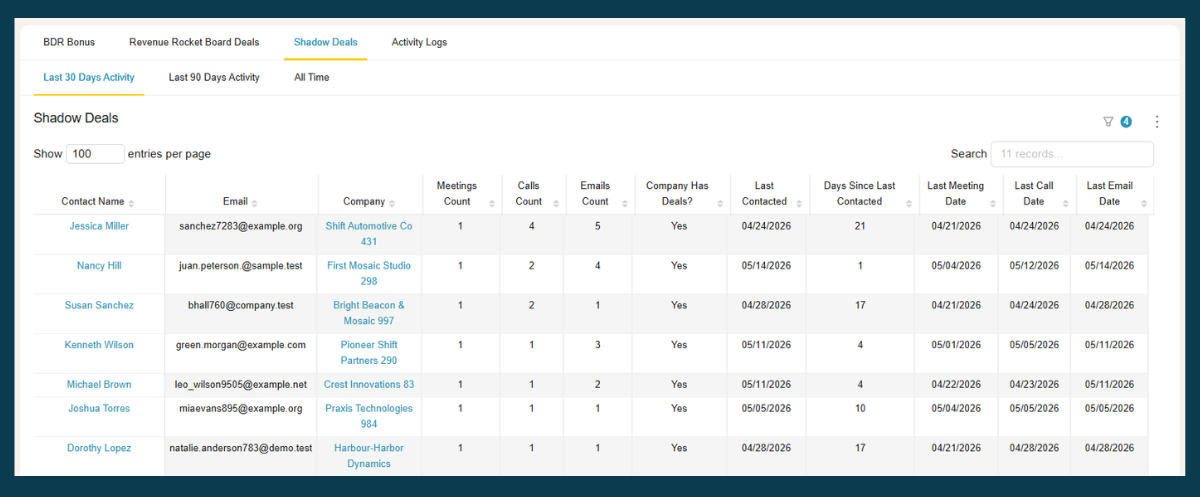
See your shadow deals in HubSpot — without the manual hunt. BlinkMetrics’ HubSpot Shadow Deals view cross-references contact activity against your deal records, so the late-logged deals surface on their own:
- Ranks contacts by meeting, call, and email activity at companies that have deals — over the last 30 days, 90 days, or all time
- Surfaces the gap between when a relationship actually started and when the deal was created in HubSpot
- Sends you straight to the deal so you can correct the creation date, or log a true start date, in a couple of clicks
→ See shadow deals in your own HubSpot — book a 1:1 with our founder, Nathan
The rest of this post covers how shadow deals happen, what they corrupt in your numbers, and how to fix the underlying habit.
How shadow deals happen
The most common cause is simple: reps log deals when they win them, not when they start working them.
A deal exists in a rep’s head and in their email thread long before it exists in HubSpot. When the deal closes, or when a manager asks why nothing is in the pipeline, the rep creates the deal, entering a close date that matches when it closed but the system auto-logs a deal creation date of today. HubSpot timestamps the record with the day it was created, not the day the deal relationship began.
This is rarely intentional. It’s a process gap. Reps are busy and logging new deals in the CRM is low priority when they’re focused on getting the deal won. In some teams, CRM hygiene is only enforced at end of quarter, which is also when shadow deals cluster most heavily.
A few patterns make this problem worse:
- No pipeline entry requirement at first contact. If reps aren’t expected to create a deal record when they start working an opportunity, they won’t.
- No visibility into when deals were created vs. when activity started. Without cross-referencing, managers can’t see the gap.
- End-of-quarter logging sprints. Deals that were worked over three months get entered in the final week, right before close.
What shadow deals corrupt in your reporting
The downstream effects show up in almost every sales metric your team tracks.
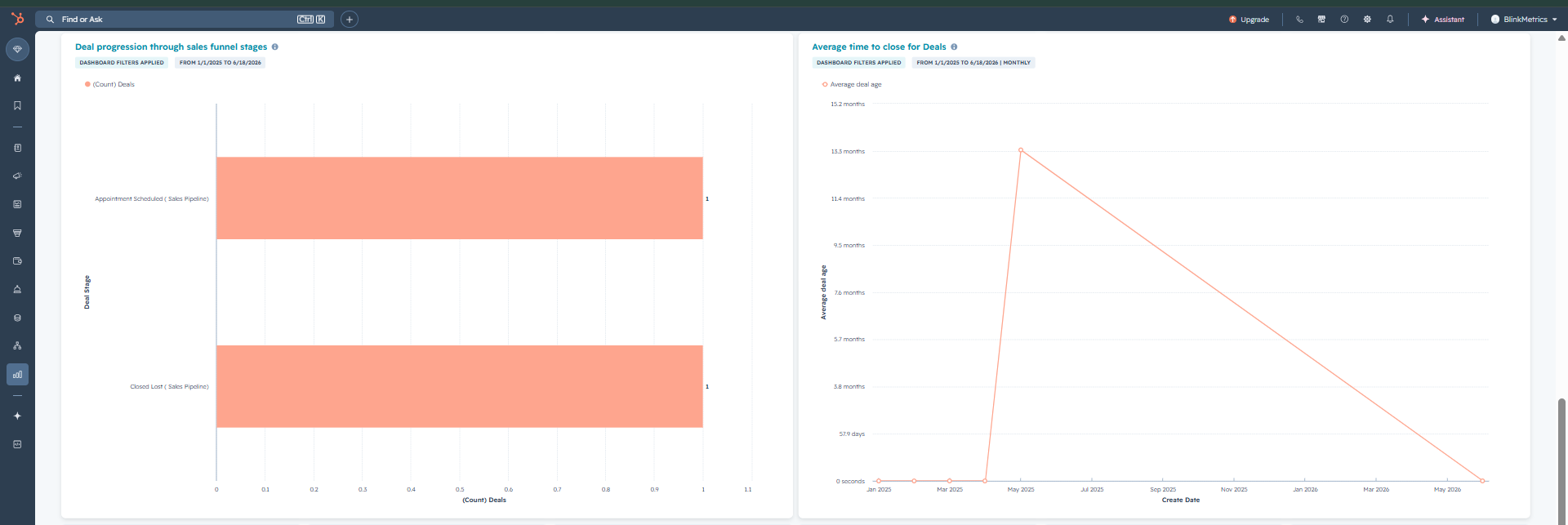
Sales cycle length is the most obvious one. If a deal was actively in progress for 90 days but was only in HubSpot for 7 days, your average sales cycle looks artificially short. When you use that number to plan hiring or forecast capacity, you’re planning against a number that doesn’t reflect reality.
Stage conversion rates break because shadow deals typically skip straight from “deal created” to “Closed Won,” bypassing every intermediate stage. If 30% of your closed deals never passed through Discovery or Proposal, your conversion rates for those stages are inflated, which makes your pipeline look healthier than it is.
Pipeline forecasts rely on conversion rates and velocity. If both inputs are wrong, the forecast is wrong. Teams using shadow-deal-contaminated data tend to underestimate how long deals take and overestimate how likely pipeline deals are to close.
Rep performance comparisons skew in predictable ways. A rep who logs deals late looks more efficient than they are: short cycles, high conversion. A rep who logs deals at first contact looks slower because their timeline is accurate.
Cohort analysis groups deals by creation date. Shadow deals fall into the wrong cohort: a deal worked in Q3 but created in Q4 shows up as a Q4 deal.
How to find shadow deals in HubSpot
HubSpot doesn’t flag shadow deals automatically, but you can surface them with the right filters.
The clearest indicator is a short gap between deal creation date and close date. A deal created and closed within 7 days is worth examining, especially if the associated contact has email threads, meetings, or call logs that predate the deal creation. You can set up a deal report in HubSpot filtered to Closed Won deals where creation date and close date are within a short window.
From there, you need to cross-reference against contact activity. Open the contact record for the associated deal and look at the activity timeline: emails, logged calls, meetings. If the first email thread is dated three months before the deal creation date, the deal was logged late.
The problem with this manual process is scale. Checking creation date vs. activity date deal by deal is time-consuming, and you’ll miss deals where the rep’s email activity wasn’t logged in HubSpot at all (which is its own data quality issue).
A more systematic approach is to export your Closed Won deals and flag all cases where the creation-to-close gap is shorter than your actual median sales cycle. That gives you a list of candidates to investigate.
How BlinkMetrics helps you spot shadow deals
BlinkMetrics gives you the surface area to spot shadow deals. The Shadow Deals view lists contacts at companies that have deals, ranked by meeting, call, and email activity over the last 30 days, 90 days, or all time. Heavy contact activity tied to a company with a deal is a useful signal that the deal record may not capture when the relationship actually began. From there, you can open the underlying deal in HubSpot, compare the activity timeline to the deal creation date, and decide whether to correct it.
This doesn’t fix the underlying CRM record (that requires manual updates to deal properties in HubSpot), but it gives you a faster starting point than manually filtering Closed Won deals and cross-referencing each contact’s activity timeline by hand.
Want to start spotting shadow deals in your pipeline? Start with a 1:1 strategy call with our founder, Nathan.
What to do about shadow deals going forward
Fixing existing shadow deals is partly a data problem and partly a process problem. Both matter.
For existing data: Once you’ve identified which deals were logged late, you can correct the creation date in HubSpot (it’s auto-set by the system but is also an editable field) or add a custom property for “estimated deal start date” that captures when the relationship actually began. The second approach is less disruptive and preserves the original audit trail.
For the process: The root cause is that reps don’t create deals until they’re prompted to. A few changes help:
- Require deal creation at first qualified meeting or call, not at close
- Create a lightweight first stage (“Contacted” or “Initial Meeting”) that reps can move deals into quickly. Low friction means higher compliance
- Add deal creation date to rep reporting so managers can see patterns without doing manual audits
- Run a monthly review of deals where creation date and close date are within 14 days
Even partial improvements matter. If reps start logging deals a week earlier than they were, your sales cycle data becomes meaningfully more accurate over time.
Frequently asked questions
What is a shadow deal in a CRM?
A shadow deal is a deal record created in a CRM after the deal was already won, or so close to close that it skips most of the pipeline stages the rep actually worked through. The deal has a creation date that doesn’t reflect when the sales relationship began. Because the CRM record doesn’t capture the deal’s real history, any metric based on deal timelines (sales cycle, stage conversion rates, velocity) will be inaccurate.
How do I find deals that were created after they closed in HubSpot?
Filter your HubSpot Closed Won deals for cases where the deal creation date is within a short window before the close date (7 or 14 days is a reasonable starting point). Cross-reference those deals against contact activity logs: if emails or meetings predate the deal creation by weeks or months, the deal was likely logged late. BlinkMetrics surfaces high-activity contacts to help you prioritize which deals to investigate.
Why does my HubSpot sales cycle data look wrong?
If your reported average sales cycle is shorter than your team’s experience suggests, shadow deals are a likely cause. Deals logged at or near close pull the average down significantly, especially if they represent a meaningful percentage of your closed deals. A few large shadow deals can shift average sales cycle by weeks.
Can HubSpot detect deals that were logged too late?
Not natively. HubSpot doesn’t compare deal creation dates against contact activity timestamps automatically. You can set up filtered reports to surface deals with very short creation-to-close gaps, but the cross-reference against email and meeting history requires manual review or a reporting tool like BlinkMetrics that surfaces high-activity contacts at deal-having companies so you can prioritize which deals to spot-check.
How do I fix CRM data quality issues from late deal entry?
Two approaches work together: correcting historical data (updating deal creation dates or adding a custom “true start date” field in HubSpot), and fixing the process that creates the problem (requiring deal creation at first contact rather than at close). The process fix prevents new shadow deals from forming; the data correction makes historical reporting more accurate. You don’t have to do both at once; most teams start with the process change and backfill corrections for their highest-impact deals.