
GoHighLevel tracks your closed opportunities, but it has no way to calculate what your sales team actually earned in commission or bonuses. Most agency owners and SaaS teams end up exporting opportunity data, pasting it into a spreadsheet, and rebuilding the math every payout cycle. A reporting layer on top of GHL can apply your bonus rules to opportunity data automatically, so the calculation stays current without the manual work.
Turn GoHighLevel opportunity data into per-rep payouts — automatically. Define your comp rules once and BlinkMetrics applies them to every closed opportunity:
- Tiers, thresholds, service bonuses, and setter/closer splits applied to your GHL opportunities
- Per-rep payout amounts in a live dashboard, refreshed as opportunities close
- Aggregates each rep’s production across every sub-account they work — one payout total, no per-account exports
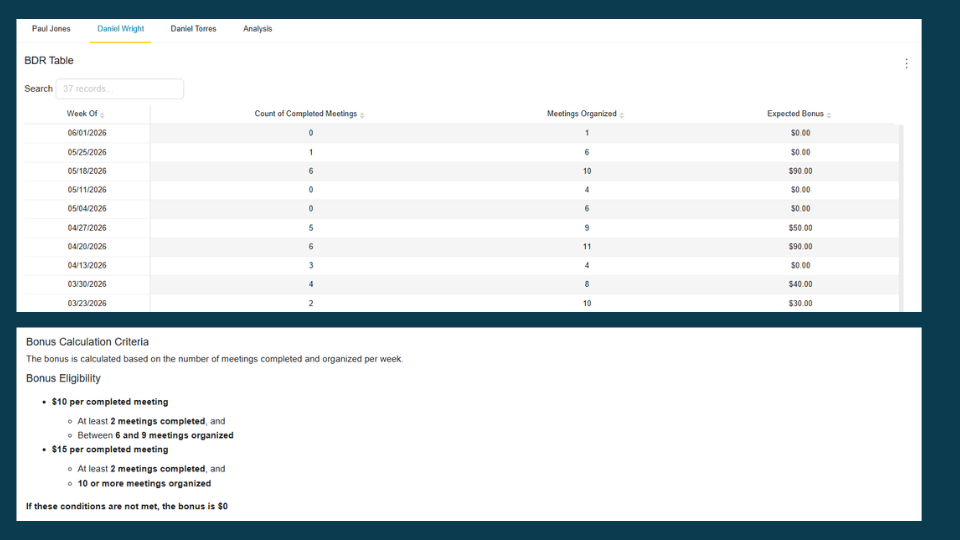
Calculating commissions and bonuses doesn’t require a dedicated ICM tool. It requires opportunity data, rules, and a reporting layer that can apply both. BlinkMetrics’ GoHighLevel reporting ships a payout dashboard view that takes your tier and threshold rules and shows who qualifies and for how much, refreshed automatically as new opportunities close. The rest of this post breaks down what GoHighLevel gives you natively, where the spreadsheet workaround breaks, and what the automated approach looks like.
GHL’s Affiliate Manager is not GoHighLevel commission tracking for sales reps
This distinction trips up a lot of GHL users searching for “gohighlevel commission” answers. GoHighLevel has a built-in Affiliate Manager module, but it handles a completely different use case.
| Feature | Affiliate Manager | Sales rep bonus calculation |
|---|---|---|
| Purpose | Track referral/affiliate commissions for people who send you leads | Calculate payout amounts for your internal sales team based on closed opportunities |
| Data source | Affiliate links, referral tracking codes | Opportunity value, close date, assigned rep, pipeline stage |
| Who gets paid | External affiliates, referral partners | Your in-house closers, setters, account managers |
| Built into GHL? | Yes | No |
If you’re looking to pay affiliates who refer clients to your agency, the Affiliate Manager handles that. If you need to calculate how much your sales rep earned from the opportunities they closed this month, you need something else entirely. GHL has no native feature for this. There’s even an open feature request on ideas.gohighlevel.com for a “Sales Commission Tracker” that confirms the gap.
What GoHighLevel gives you to work with
GHL stores useful data on every opportunity in your pipeline:
- Opportunity value: The monetary amount attached to each opportunity
- Pipeline and stage: Which pipeline the opportunity lives in and its current stage (e.g., “New Lead,” “Proposal Sent,” “Closed Won”)
- Assigned user: Which team member owns the opportunity
- Close date / status change date: When the opportunity moved to a won stage
- Contact and source data: The associated contact, tags, and lead source
- Custom fields: Any additional fields your team has configured
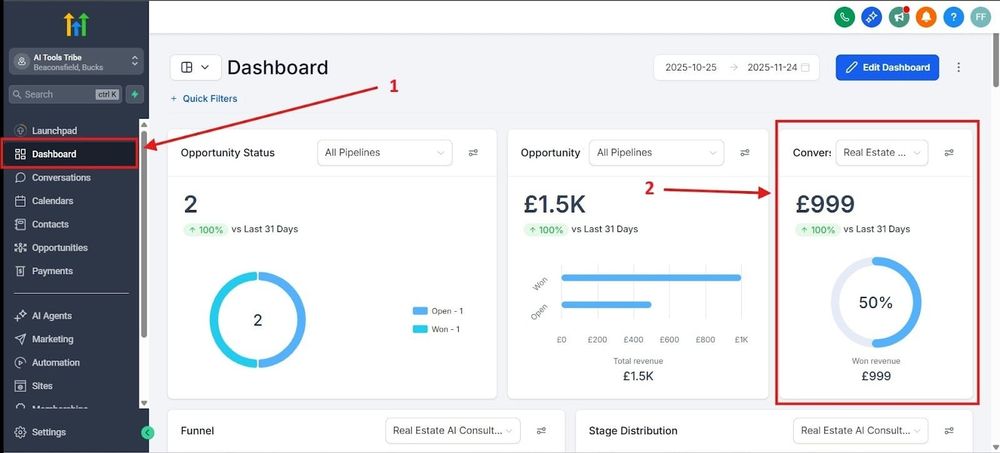
The GHL Reports tab shows aggregate numbers: total opportunity counts, pipeline value, conversion rates. You can filter by date range and pipeline. But there’s no way to say “apply an 8% commission rate to all Closed Won opportunities above $2,000 for Rep A” or “add a $500 bonus for any opportunity that includes our premium package.” The conditional logic for bonus calculations doesn’t exist in GHL’s native reporting.
The spreadsheet approach (and when it stops working)
For an agency with two or three closers, a spreadsheet is fine. Here’s what to do:
- Export closed opportunities from GHL for the pay period
- Paste the data into a template with commission formulas
- Filter by assigned user
- Apply rate calculations (flat percentage, tiered rates, bonuses for specific services)
- Sum payout amounts per rep
- Review and share results
This works until it doesn’t. Common failure points for growing agencies:
- New service tiers get added, and the formula column doesn’t account for them
- A setter/closer split requires dividing credit between two people on the same opportunity
- Sub-account data needs to be combined across multiple client pipelines for a team member who works across accounts
- Someone edits a formula accidentally, and payout numbers are wrong for a cycle before anyone catches it
- The export step gets skipped or delayed, and a late-closed opportunity gets missed
The calculation logic is usually straightforward. The pain is in the repetitive data prep and the risk of human error compounding over time.
How to automate GoHighLevel commission calculations from opportunity data
A reporting tool that connects to GoHighLevel and reads opportunity data directly eliminates the export-and-paste cycle. You define your bonus rules once, and the calculation runs automatically as opportunities close.
The setup:
- Connect to your GHL account so the tool can read opportunity data (values, stages, assigned users, dates)
- Define your bonus criteria: which pipelines count, what stages qualify as “won,” what commission rate applies, and any thresholds or tiers
- The tool filters and calculates payout amounts per rep, updated as new opportunities close
At BlinkMetrics, we built a bonus payout view for this use case. You set the criteria (pipeline, stage, value range, date window, assigned user), and the dashboard shows qualifying opportunities per rep with calculated payout amounts. It updates automatically as GHL data syncs.
Want to see this working with your GHL data? Let’s talk.
Bonus structures that work with GHL opportunity data
The types of comp plans you can build depend on what opportunity properties your team tracks in GHL. Here are structures that are common for agencies and SaaS businesses:
| Comp structure | How it works | GHL data required |
|---|---|---|
| Flat percentage | Rep earns X% of every closed opportunity | Opportunity value, assigned user, stage |
| Tiered rates | 5% on first $20k/month, 8% above that | Opportunity value, assigned user, close date |
| Setter/closer split | Setter gets 3%, closer gets 5% of the same opportunity | Custom fields for setter and closer roles |
| Service-based bonus | Extra $200 for opportunities that include a specific service | Custom fields or tags identifying service type |
| Client revenue share | Team member earns a percentage of recurring client revenue | Sub-account pipeline data, opportunity value |
| Minimum threshold | Commission only kicks in after $10k in closed opportunities per month | Opportunity value, assigned user, close date |
A note on quota tracking
GHL has no native quota field. If your comp plan includes quota attainment (e.g., “1.5x multiplier above 120% of target”), you’ll need to track targets either in the reporting tool or in a GHL custom field. Both approaches work. The quota number just needs to live somewhere the calculation can reference it.
Working across sub-accounts
This is specific to GHL and worth calling out. Many agencies run separate sub-accounts for each client, with sales team members working across multiple accounts. If a closer handles opportunities in three different client sub-accounts, their bonus calculation needs to pull data from all three.
GHL’s native reporting is scoped to individual sub-accounts. There’s no built-in way to aggregate a single rep’s closed opportunities across accounts. A reporting tool that connects at the agency level and reads data across sub-accounts solves this. You get one view of each rep’s total production, regardless of which sub-account the opportunity lives in.
Automate your GoHighLevel commission payouts
Define your tiers, thresholds, and product rules once. BlinkMetrics applies them to every won opportunity and shows payout amounts per agent, with no monthly spreadsheet, no manual reconciliation, no payout errors. See how BlinkMetrics works with GoHighLevel, or book a 30-minute walkthrough and we’ll show you a live payout dashboard built from your GoHighLevel data.
Frequently asked questions
Does GoHighLevel have built-in commission tracking for sales reps?
No. GHL has an Affiliate Manager module for tracking referral and affiliate commissions, but there’s no native feature for calculating sales rep bonuses or commissions based on closed opportunity data. Sales teams typically export opportunity data and run calculations in a spreadsheet or use an external reporting tool.
What is the difference between GHL’s Affiliate Manager and sales rep commission calculation?
The Affiliate Manager tracks commissions owed to external referral partners and affiliates who send leads to your business through tracked links. Sales rep commission calculation is about determining payout amounts for your internal team members based on the opportunities they closed. These are separate workflows with different data sources.
Can I calculate sales bonuses from GHL opportunity data without a dedicated ICM platform?
Yes. If your comp plan is based on opportunity values, close dates, assigned users, and other standard GHL opportunity properties, a reporting tool like BlinkMetrics that reads your GHL data can apply your bonus criteria and calculate payouts automatically. Enterprise ICM platforms are built for large sales organizations with complex hierarchical plans. Most agencies and SaaS teams on GHL have simpler structures that don’t require that overhead.
How do I handle setter/closer splits in GHL bonus calculations?
GHL allows custom fields on opportunities. Add fields to track which team member set the appointment and which one closed the deal. Your reporting tool can then apply different commission rates to each role on the same opportunity. Without custom fields identifying both parties, GHL only tracks a single assigned user per opportunity.
Can I track bonuses across multiple GHL sub-accounts for one rep?
Not natively. GHL’s reporting is scoped per sub-account, so a rep working across three client accounts would need three separate exports. A reporting tool that connects at the agency level can aggregate opportunity data across sub-accounts and calculate a single payout total per rep.