

A NetSuite implementation usually runs between $50,000 and $250,000 in the first year once you add up licenses, the implementation partner, and the months of internal time it takes to go live. Complex rollouts run higher. If the reason you’re looking at NetSuite is reporting, that you can’t see across your tools and leadership keeps asking questions nobody can answer quickly, that’s an expensive way to buy a dashboard.
NetSuite is a full ERP. It’s built to run your operations, not just report on them. The reporting is genuinely capable, but it comes bundled inside a system you’re paying six figures to adopt. Before you commit, it’s worth separating the two questions: do you need the operational system, or do you need the visibility it happens to include?
What does a NetSuite implementation cost?
NetSuite pricing isn’t published, and the total depends heavily on your size, modules, and how custom your processes are. These are the commonly cited ranges for a small or mid-market rollout in 2026:
| Cost component | Typical range |
|---|---|
| Annual license (base platform + modules) | $12,000 to $50,000+ per year |
| Per-user licenses | ~$100 to $150 per user, per month |
| Implementation (one-time, partner-led) | $25,000 to $150,000+ (complex: $250,000 to $500,000) |
| Time to first value | 3 to 6 months (simple) up to 12 to 18 months (complex) |
| Post-launch optimization and consultants | $25,000 to $50,000+ common in year one |
Two parts of that table catch most teams off guard.
The first is that the license is the smaller number. The implementation, the partner who configures it, and the rework afterward usually cost more than the software itself. NetSuite is sold by partners, and the platform only does what it’s configured to do, so the configuration is where the money and the time go.
The second is the timeline. The cost isn’t only dollars. It’s a year or more of your team running two systems in parallel, retraining on new workflows, and waiting for the reports they were promised. Plenty of implementations stall at the 12-month mark with six figures already spent.
Why most teams start looking at NetSuite
In most evaluations we see, the trigger isn’t “we need an ERP.” It’s a question somebody senior asked that took half a day in spreadsheets to answer. The pattern repeats, and eventually leadership decides the toolset is broken.
Those questions tend to split into two kinds:
- Visibility questions. “Which customers are quietly drifting?” “What’s revenue by product line, this quarter versus last?” “How do sales activity and invoicing track against each other?”
- Operational questions. “Why doesn’t a closed deal in our CRM create an invoice automatically?” “Why can’t support see the latest order status?” “Why does every refund need manual cleanup across three systems?”
NetSuite is built to answer the operational ones. It moves data between functions and gives every team one operational record. The visibility questions, the ones that usually start the search, don’t need an ERP to answer. They need the data you already have on one screen.
What NetSuite reporting does well
NetSuite reporting is genuinely capable, and it’s worth being fair about it. Its strengths:
- Real-time financial reporting straight off the live ledger, including multi-entity and multi-currency consolidation. This is its strongest area.
- Saved searches, NetSuite’s flexible query engine, which let you filter and surface records against detailed criteria.
- SuiteAnalytics Workbook for pivot-table and chart analysis on NetSuite data.
- Role-based dashboards with KPI portlets, reminders, and report snapshots tailored to each user’s role.
- Drill-down from a summary figure to the underlying transaction without leaving the system.
If your business runs inside NetSuite, this reporting works well, because the data it needs is already there.
Where NetSuite reporting falls short
The limits show up fast once your questions reach beyond the ledger:
- It only reports on data inside NetSuite. Anything living in your CRM, your support tool, Stripe, your ad platforms, or your project tool isn’t there unless you build and maintain an integration to bring it in.
- Customizing reports usually means a consultant. Saved searches and Workbook are powerful, but building the report you actually want is rarely self-serve for a business user. Non-trivial changes tend to become billable hours.
- Blended, cross-system metrics are hard. A number like customer acquisition cost (ad spend against closed revenue) pulls from systems NetSuite doesn’t hold, so it can’t produce it on its own.
- The visualization is functional, not modern BI. Many teams still export to Excel or layer a separate BI tool on top to get the views and charts they want.
None of this makes NetSuite a bad ERP. It makes it an ERP, a system of record that reports on its own records well and on everything else poorly.
Do you need NetSuite, or just better reporting?
Run a simple test before you commit. Write down the questions your team can’t answer today, specifically. Then ask whether each one is solved by putting existing data on one screen or by changing how data flows between systems.
| You likely need NetSuite if… | A reporting layer is probably enough if… |
|---|---|
| You need to consolidate financials across multiple entities, subsidiaries, or currencies in one ledger | The trigger was a visibility question, not a workflow that’s actually breaking |
| You run inventory, manufacturing, or supply chain that needs integrated order-to-cash workflows | Your current tools (QuickBooks, HubSpot, Stripe, Asana, and so on) work fine on their own |
| Your tools can’t transact at your volume and you need one operational system of record | You’re exporting to spreadsheets to answer leadership’s questions |
| You need processes to flow between functions automatically, not just be reported on | You want dashboards, not a new system of record |
In our experience, most teams that run this test end up on the right. The questions that started the search were visibility questions, and the migration would have spent a year and six figures solving a problem reporting could have solved in a month.
If you’re on the left, NetSuite (or a serious integration project) is genuinely on the table, and you should run it. We’re not going to talk you out of an ERP you actually need.
The math, side by side
For the teams whose real problem is visibility, the cost comparison is stark:
| NetSuite | Reporting layer | |
|---|---|---|
| Up-front cost | $50,000 to $250,000+ in year one | $5,000 to $15,000 to build |
| Time to value | 12 to 18 months is common | About 30 days |
| What changes for your team | Retrain everyone, migrate every system | Nothing; the dashboard sits on top |
| What you replace | Your CRM, accounting, project tools | Nothing; it reads from what you have |
| What you get | An operational system of record | The cross-system view you were missing |
Where BlinkMetrics fits
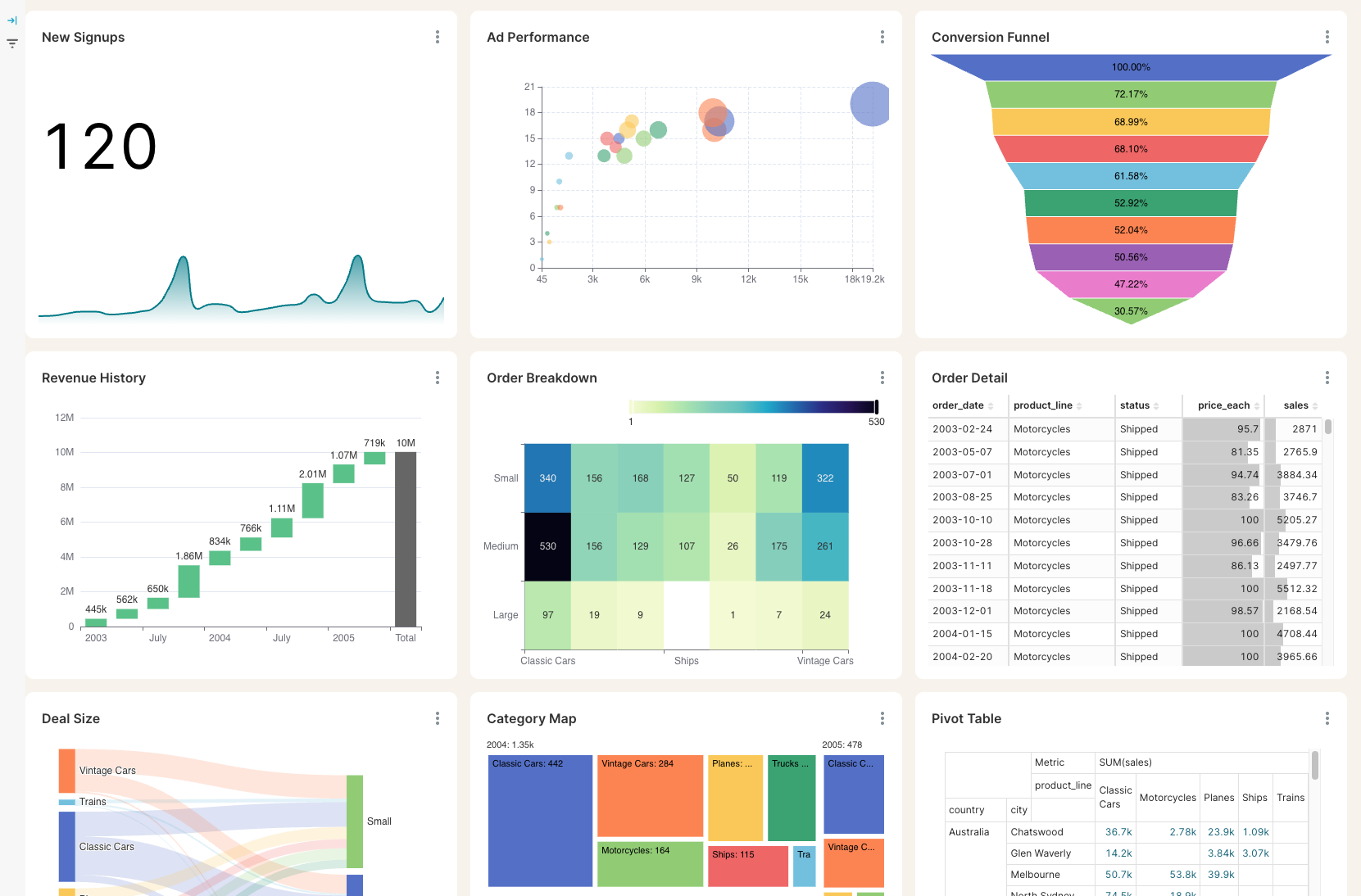
If your real problem is reporting, a reporting layer solves it without the migration. That’s what we build at BlinkMetrics: cross-system dashboards that read from the tools you already use, including NetSuite if you have it, and present the combined picture on one screen. The example below pulls signups, ad performance, revenue history, and order data from separate systems into a single view.
Three things to know about how it works:
- Nothing changes inside your existing tools. Each system stays where it is. The reporting layer reads from them and writes to none of them.
- It’s read-only by design. No two-way sync, no field-mapping conflicts, no operational risk.
- It’s built in weeks, not years. A typical project ships in around 30 days, with ongoing hosting from about $250 a month.
If you already run NetSuite, this still applies. NetSuite’s built-in reporting is rigid, and customizing it usually means going back to a consultant. We pull NetSuite data alongside your other tools and build the cross-system views NetSuite alone can’t.
Book a call and tell us what’s pulling you toward NetSuite. If you genuinely need the ERP, we’ll say so. If you just need the reporting, you’ll leave the call knowing what the lighter option costs and how fast it ships.
For more on the decision itself, see why considering NetSuite often means solving the wrong problem and the efficient alternative to an in-house data team. If you’ve already decided reporting is the real need, see how the NetSuite alternative for teams that only need visibility compares, side by side.
Frequently asked questions
Do you need NetSuite for reporting?
Usually not. If the reason you’re evaluating NetSuite is that you can’t see across your tools, that’s a reporting problem, and a reporting layer that reads from your existing systems solves it for a fraction of the cost. You need NetSuite when you need an operational system of record, not just visibility.
What does a NetSuite implementation cost?
For a small or mid-market business, expect $50,000 to $250,000 in the first year once licenses, the implementation partner, and post-launch work are added up. Complex rollouts with heavy customization can reach $500,000. The implementation and consulting usually cost more than the software license itself.
What are NetSuite’s reporting limitations?
NetSuite reports well on data inside NetSuite, but it can’t easily report on data in your CRM, support tool, payment processor, or ad platforms unless you build integrations. Customizing reports often requires a consultant, and blended cross-system metrics are difficult, which is why many teams still export to Excel or add a separate BI tool.
Can you get cross-system reporting without NetSuite?
Yes. A reporting layer connects to the tools you already use and presents the combined data on one dashboard, without replacing any of them. It typically takes about 30 days to build and costs far less than an ERP migration.
Does BlinkMetrics replace NetSuite?
No. BlinkMetrics is a reporting layer, not an ERP. If you need operational consolidation (multi-entity financials, inventory, manufacturing workflows), NetSuite is the right tool and BlinkMetrics doesn’t replace it. If you only need to see across your tools, BlinkMetrics gives you that without the migration, and it works alongside NetSuite if you already have it.