
Shadow opportunities are opportunity records created in GoHighLevel at or near the point they closed, skipping every pipeline stage they actually moved through. Your GoHighLevel pipeline shows a new opportunity entering last Tuesday and closing on Thursday. But the rep had been emailing and calling that contact for six weeks. Your sales cycle data says two days. The real answer is closer to 45.
This problem hits every CRM, but GoHighLevel’s flexibility makes it especially hard to detect. Custom pipelines, workflow automations, and the sub-account structure all create conditions where shadow opportunities form in ways that other platforms don’t.
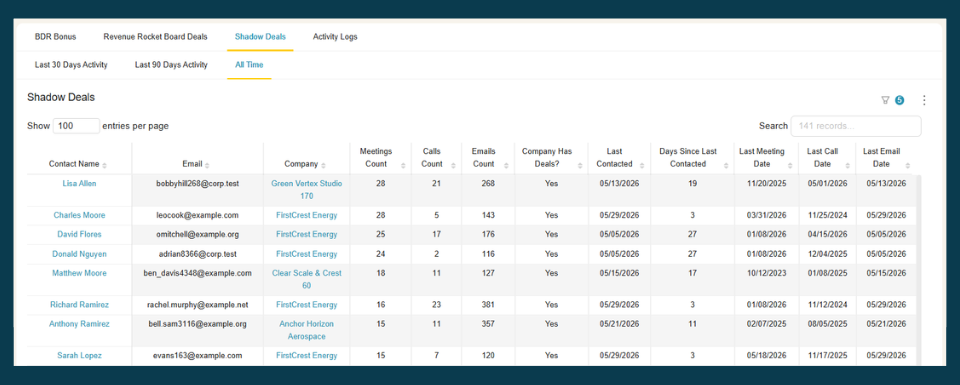
Spot the shadow opportunities in your GoHighLevel pipeline — without the manual audit. BlinkMetrics cross-references every opportunity’s creation date against the contact’s real activity, so the records skewing your numbers surface on their own:
- Flags won opportunities whose calls, SMS, and emails predate the opportunity’s creation date, and estimates a true start date
- Surfaces workflow-generated “ghost” opportunities sitting in early stages with no activity, so you can separate real pipeline from automation noise
- Works across sub-accounts from one view, so agency-level reporting isn’t skewed by one client’s data-entry habits
→ See which opportunities in your pipeline are shadow deals — book a 1:1 with our founder, Nathan
The fix isn’t chasing down every late-logged opportunity manually. It’s surfacing the signals that flag a shadow deal in the first place. BlinkMetrics’ GoHighLevel reporting cross-references contact activity against opportunity records so the patterns become visible without manual review. Here’s how shadow deals happen, what they corrupt in your numbers, and how to fix the underlying habit.
What creates shadow opportunities in your GoHighLevel pipeline
The classic version is the same as any CRM: a rep works a contact through calls, texts, and emails, then only creates the opportunity record when the deal is ready to close. The opportunity gets a creation date from today, not from when the work actually started.
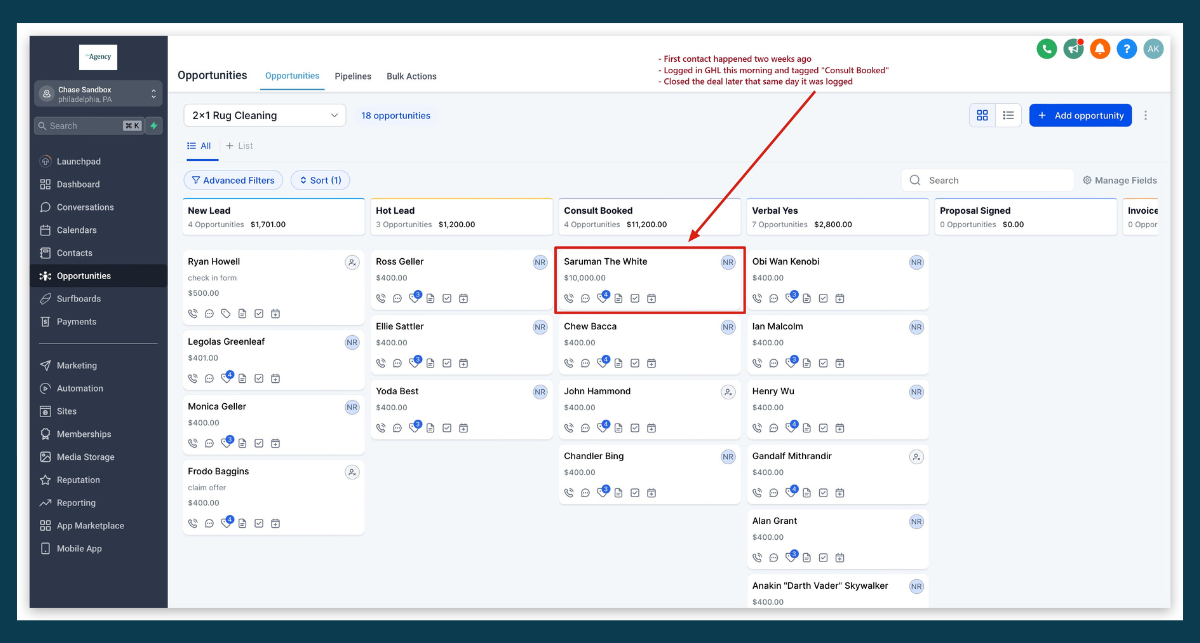
But GHL has two additional causes that are specific to how the platform works.
Workflow-generated ghost opportunities
GoHighLevel workflows can auto-create opportunities when a contact submits a form, books an appointment, or triggers any automation event. These opportunities land in your pipeline at a stage like “New Lead” or “Form Submitted” and sit there.
The problem: many of these auto-created opportunities are never actually worked. The contact filled out a form but never responded to follow-up. The opportunity still exists in your pipeline, inflating your total count and dragging down your stage conversion rates.
This is a different flavor of shadow opportunity. Instead of a real deal that was logged too late, it’s a fake deal that was logged too early (or shouldn’t have been logged at all).
- Auto-created from form submissions that never convert to real conversations
- Auto-created from appointment bookings where the contact no-shows
- Auto-created from workflow triggers that cast too wide a net
These ghost opportunities make your GoHighLevel pipeline look fuller than it actually is. And because they sit in early stages indefinitely, your stage-to-stage conversion rates drop, making it look like your sales process has a leak when it’s really a data entry problem.
Late-logged opportunities in the agency context
GHL is built for agencies managing client accounts through sub-accounts. This creates a reporting dynamic that other CRMs don’t have: the sub-account manager (or client team) logs opportunities in their pipeline, and the agency owner reviews that data to gauge performance.
When a sub-account manager closes a deal offline and then logs it in GoHighLevel after the fact, the opportunity shows up with a compressed timeline. The agency owner sees a fast close and healthy conversion rates. The actual sales process took much longer.
This happens most often when:
- Sub-account managers report results to the agency on a weekly or monthly cadence
- Client teams treat GHL as a reporting tool rather than a daily workflow tool
- End-of-month logging sprints push multiple won opportunities into the pipeline at once
What shadow opportunities break in your reporting
The downstream effects show up across your GoHighLevel reporting.
| Metric | How shadow opportunities distort it |
|---|---|
| Sales cycle length | Opportunities logged at close show artificially short cycles (days instead of weeks) |
| Stage conversion rates | Late-logged opportunities skip stages; auto-created ones inflate early stages |
| Pipeline value | Ghost opportunities from workflows inflate total pipeline without real revenue behind them |
| Forecasting accuracy | Both velocity and conversion inputs are wrong, so the forecast compounds the errors |
| Rep/team comparisons | Reps who log late look more efficient; reps who log early look slower |
| Sub-account health | Agency owners comparing client pipelines get misleading signals about which accounts are performing |
The agency layer makes this worse than in a single-team CRM. If you’re comparing pipeline health across 10 sub-accounts and three of them have shadow opportunity problems, your cross-client reporting is unreliable.
How to find shadow opportunities in your GoHighLevel pipeline
GHL doesn’t have a built-in tool to flag shadow opportunities. But you can surface them with a few manual checks.
Check creation-to-close gaps
Start with your won opportunities and look at the gap between creation date and close date. Any opportunity created and moved to “Closed Won” within a suspiciously short window (say, under 7 days) is a candidate.
In GoHighLevel:
- Go to Opportunities and filter by pipeline stage (“Closed Won” or your equivalent)
- Sort by creation date
- Compare creation date to the date the opportunity moved to the won stage
Any opportunity where those dates are within a few days of each other deserves a closer look.
Cross-reference the contact activity timeline
This is the most reliable check. Open the contact record associated with a suspicious opportunity and scroll through the activity timeline. Look for:
- Calls or SMS messages that predate the opportunity creation date
- Emails sent or received before the opportunity existed
- Appointment bookings logged before the opportunity was created
If a contact has three weeks of call logs and text messages before their opportunity was created, that opportunity was logged late.
Audit workflow-created opportunities
For the ghost opportunity problem, check how many auto-created opportunities have zero activity after creation. Filter your pipeline for opportunities in early stages (like “New Lead”) that have been there for more than 14 days with no logged calls, texts, or emails. These are likely workflow artifacts, not real sales conversations.
The scale problem
The manual approach works if you have 20 opportunities to check. It doesn’t work when you’re managing pipelines across multiple sub-accounts with hundreds of opportunities each. Checking contact timelines one by one against opportunity creation dates is time-consuming, and it’s easy to miss patterns that only show up in aggregate.
How BlinkMetrics flags shadow opportunities automatically
BlinkMetrics connects to your GoHighLevel account and cross-references opportunity creation dates against contact activity timelines across your pipelines. Where activity (calls, SMS, emails) predates opportunity creation by a meaningful margin, it surfaces the opportunity in a shadow deals dashboard so you can review the opportunity and estimate a “true start date” based on when the first real engagement happened.
For workflow-generated ghost opportunities, BlinkMetrics can identify opportunities sitting in early pipeline stages with no associated activity, so you can separate real pipeline from automation noise.
The output is a corrected view of your GoHighLevel CRM data: which opportunities have suspect timelines, what the estimated real start date is, and what your sales cycle and conversion metrics look like with corrections applied.
Want to see which opportunities in your pipeline might be shadow deals? Watch BlinkMetrics perform shadow deal identification live on a demo call.
Preventing shadow opportunities going forward
Fixing the data is one side. Fixing the process prevents new shadow opportunities from forming.
For late-logged opportunities:
- Require opportunity creation at first meaningful contact (call, booked appointment, or responded SMS), not at close
- Add a lightweight first stage to your pipeline (“Contacted” or “Initial Conversation”) with low friction to enter
- Run a monthly audit of opportunities where creation date and close date are within 14 days
- If you manage sub-accounts, include creation-to-close gap as a metric in your agency reporting reviews
For workflow-generated ghost opportunities:
- Tighten your workflow triggers so opportunities are only auto-created after a qualifying action (like a confirmed appointment, not just a form fill)
- Add a workflow step that moves stale auto-created opportunities to a “Disqualified” or “No Response” stage after 14 days of inactivity
- Separate your pipeline into stages that distinguish between automation-created records and rep-qualified records
For both:
- Add opportunity creation date to your standard GoHighLevel reporting views so gaps are visible without manual checking
- Treat pipeline data quality as a recurring review topic, not a one-time cleanup
GHL’s custom pipeline stages give you the flexibility to build these safeguards directly into your workflow design. A stage like “Auto-Created (Unqualified)” sitting before “Qualified Lead” makes it obvious which opportunities came from automation and which came from real conversations.
Stop letting shadow deals distort your GoHighLevel numbers
BlinkMetrics surfaces high-activity contacts at contacts with existing opportunities so your team can spot late-logged opportunities before they wreck velocity, conversion, and forecast metrics. See how BlinkMetrics works with GoHighLevel, or book a 30-minute walkthrough and we’ll show you what shadow deals look like inside your own GoHighLevel pipeline.
Frequently asked questions
What is a shadow deal in GoHighLevel?
A shadow deal (or shadow opportunity, in GHL terminology) is an opportunity record created in GoHighLevel after the sales relationship already started, or created automatically by a workflow but never actually worked. In both cases, the opportunity data in your pipeline doesn’t reflect the real sales timeline. Metrics like sales cycle length, stage conversion rates, and pipeline value become unreliable.
How do I find opportunities that were logged late in GoHighLevel?
Filter your won opportunities for cases where the creation date is within a short window of the close date (7 to 14 days is a reasonable starting point). Then open the associated contact record and check the activity timeline for calls, SMS messages, or emails that predate the opportunity creation. If activity started weeks before the opportunity was created, it was logged late.
Why does my GoHighLevel pipeline show inflated numbers?
If your pipeline total is higher than expected, workflow-generated opportunities are a common cause. GHL workflows can auto-create opportunities from form submissions, appointment bookings, or other trigger events. Many of these auto-created opportunities are never followed up on and sit in early stages indefinitely. Filtering for opportunities with no activity after creation will help you identify the noise.
Can GoHighLevel detect shadow opportunities automatically?
Not natively. GoHighLevel doesn’t compare opportunity creation dates against contact activity timelines or flag stale workflow-generated records. You can build filtered views to surface suspicious patterns, but automated detection requires an external reporting tool like BlinkMetrics that cross-references activity data against opportunity timestamps.
How do sub-accounts make shadow opportunities harder to catch?
Each sub-account in GoHighLevel has its own pipeline and data. If you’re an agency owner reviewing performance across multiple client accounts, you’re relying on each sub-account team to log opportunities accurately. Late-logged or workflow-inflated opportunities in any sub-account will skew the aggregate numbers you see at the agency level, and there’s no built-in cross-account audit tool to flag inconsistencies.