
Short answer: When an Asana chart looks wrong, the reporting layer is usually fine and the underlying data isn’t. Three problems account for most of it: tasks missing the field a chart groups by, tasks abandoned in a state nobody monitors, and tasks closed by someone other than the person accountable for them. All three are findable, and none of them surface on their own.
Blank fields don’t show up as zero
This is the one that catches everyone, because the failure is silent.
If a chart groups completed work by product and forty tasks have no product set, those tasks don’t appear as an “unassigned” column. They’re simply absent. The chart is internally consistent, adds up correctly, and understates every bar by an unknown amount.
The same applies anywhere a field drives a view. A priority field feeding an urgency score can’t score a task that has no priority, so that task never appears in any ranked list. It isn’t deprioritised, it’s invisible, which is considerably worse.
Nobody notices because there’s nothing to notice. The absence of a row looks exactly like the absence of work.
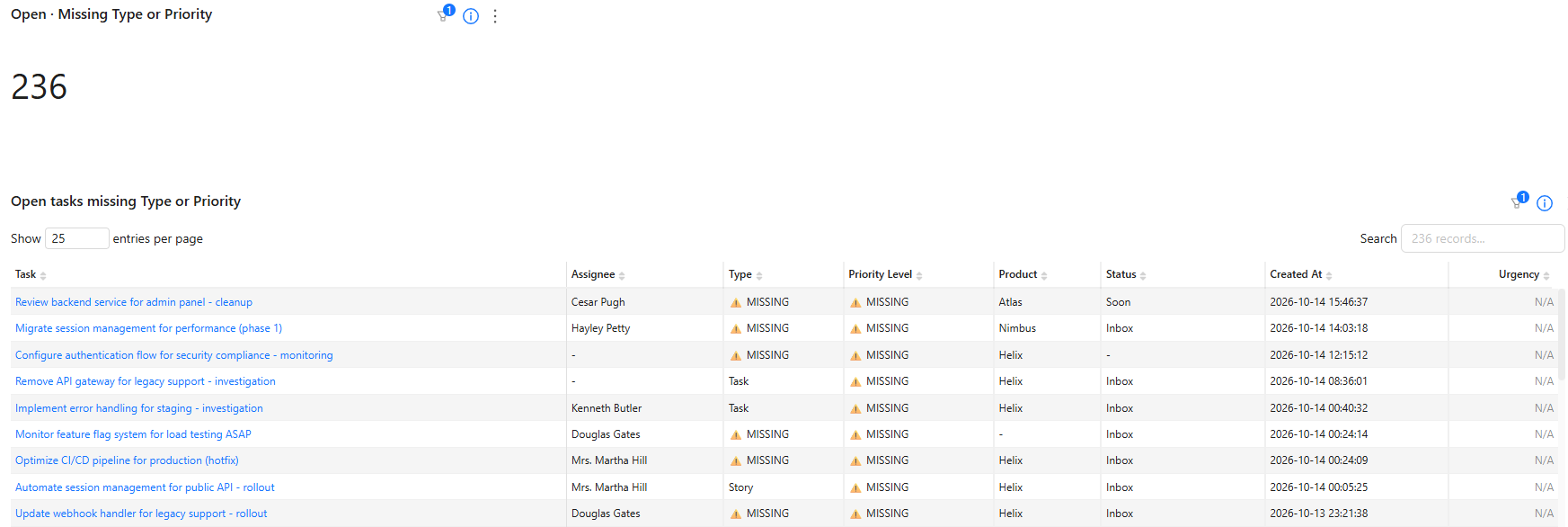
Two hundred and thirty-six open tasks missing a type or a priority is a normal number for a team that has been running a while. It’s also enough to make any chart grouped by either field meaningfully wrong.
The fix is not a policy reminder, it’s a list. Sorted by assignee, this becomes a five-minute job each week that someone can actually complete, rather than a standing instruction everyone agrees with and nobody acts on.
Work that stopped without finishing
The second class is the task that entered a state and never left it. An approval sent to someone who has since changed roles. A request so vaguely worded that nobody knew what to do, so nobody did anything.
These are worse than blank fields because they actively distort. A few items sitting for months drag an average-days-open figure upward on their own, and every conclusion drawn from that average inherits the distortion.
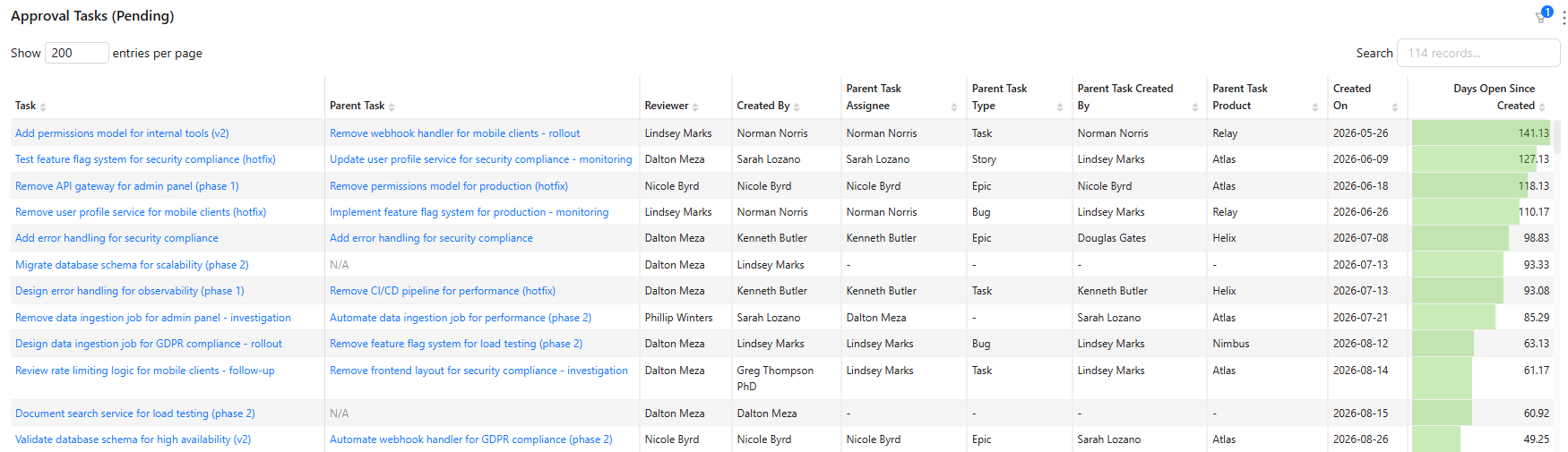
The top of the list gives it away. The oldest approval has been open 141 days, and the next three are all past 110. None of those is waiting on a slow reviewer. They fell out of the process, and chasing the rest of the queue won’t find them. Sorting oldest-first does.
Clearing just those four would bring the team’s average from 16.14 days open down to about 12. A week of chasing everything else wouldn’t move it that much. It’s covered in more depth in finding approval bottlenecks.
Closed by the wrong person
The third is quieter and more interesting. Asana records both who a task was assigned to and who actually marked it complete, and it never puts those two facts next to each other.
Most of the time a mismatch is benign: a manager tidying up, an automation closing something out. Sometimes it means work was reassigned informally without the board being updated, or closed by someone who wasn’t in a position to judge whether it was done.
Either way it’s worth a periodic look, and as a report it’s almost always short. An exception list that reads empty most weeks is working; the weeks it doesn’t are the ones worth five minutes. There’s more on it in task completion by assignee.
What Asana gives you
Advanced Search will find each of these if you know to look. You can search for incomplete tasks where a custom field is empty, or filter a project by creation date to surface old items.
Two things it won’t do. It won’t run on a schedule and put the result in front of someone, so finding these depends on remembering to check. And it won’t compare two fields against each other, which is what the completed-by mismatch requires.
So the native answer is: possible, manual, and dependent on someone thinking to do it. Which in practice means it happens once, after a report looks wrong enough to investigate.
Running it as a routine
The reports themselves are the easy part. Making them habitual is what actually keeps the data clean.
Put them on the same dashboard as the reporting they protect. A hygiene report in a separate place is a hygiene report nobody opens.
Sort by assignee, not by date. A list of 236 tasks is a project. The same list split by assignee is a short job for each person, the kind that takes minutes.
Expect empty most weeks. These are exception reports, not metrics. A dashboard tile that usually reads zero is doing its job, and the week it doesn’t is the week it earns its place.
Fix the intake, not just the backlog. If tasks routinely arrive without a priority, the fix is a required field or a rule at creation, not a weekly cleanup that runs forever.
Want the exception reports running against your own workspace? Book a call with Nathan and we’ll set them up alongside the reporting they protect.
FAQ
Why do my Asana charts show fewer tasks than I expect? Almost always because some tasks have no value in the field the chart groups by. They’re excluded rather than shown as blank, so the chart looks consistent while understating every category.
How do I find Asana tasks with a missing custom field? Advanced Search can filter for incomplete tasks where a field is empty. It won’t run on a schedule, so it finds them once rather than continuously.
Can Asana show tasks completed by someone other than the assignee? Not as a report. Asana stores both the assignee and the completing actor, but never surfaces the mismatch. Comparing them needs a reporting layer.
How often should we run these? Weekly is enough for most teams, and they should take minutes. If they take longer than that, the problem is the intake process rather than the cleanup.
Should custom fields be required? For any field your reporting depends on, yes. A blank value in a reporting field isn’t neutral, it removes the task from every view built on that field.
Related reading: finding approval bottlenecks in Asana, task completion by assignee, and Asana custom field reporting.