
Short answer: Asana has no concept of planned versus unplanned work, so nothing counts it for you. You can approximate it by tagging ad-hoc tasks and counting them at the end of a sprint. What that still won’t tell you is the part that matters: whether the work that displaced your plan was actually more important than the work it displaced.
Everyone knows why the sprint slipped
Ask any team why they missed a sprint and you’ll get the same answer: things came up. It’s almost always true, and it’s almost never measured.
That leaves the retro in an awkward place. The plan didn’t happen, everyone agrees interruptions are why, and there’s no way to tell whether that was a team responding sensibly to genuine emergencies or a team that never protected the plan in the first place. Both look identical from the outside. Both produce the same apologetic sprint review.
The distinction matters because the fixes are opposite. A team constantly pulled onto genuinely urgent work has a planning problem: they’re committing to more than their interrupt rate allows. A team pulled onto work that merely felt urgent has a discipline problem, and committing to less won’t fix it.
What Asana gives you natively
Nothing, directly. There is no built-in notion of “this was planned” and “this wasn’t.”
What you can do is approximate it structurally. Most teams that try use one of these:
- A sprint project or section. Anything in it was planned; anything completed outside it wasn’t.
- A sprint tag. Same idea, applied across projects rather than within one.
- A date-stamped custom field. Tasks carrying this sprint’s value were committed; tasks completed without it were not.
Any of those gives you a workable definition. What none of them gives you is the comparison, because Asana can filter by them but can’t count two groups against each other, and it has no notion of how important either group was.
So the honest native answer is: you can list the unplanned work, and you can list the sprint work that didn’t finish. Holding those two lists side by side and drawing a conclusion is a manual exercise.
Counting it manually
At the end of a sprint:
- Filter completed tasks for the sprint period where the sprint tag or section is absent. That’s your unplanned work.
- Filter sprint tasks that are still incomplete. That’s what got displaced.
- Count both. The ratio between them is your first useful number.
For a small team this takes ten minutes and is worth doing once, if only to see the size of the problem. Most teams are surprised: the unplanned count is usually larger than anyone guessed.
The limitation shows up immediately, though. Two teams with identical counts can be in completely different situations, and counting can’t separate them.
The measure that actually answers the question
This is the part we build for you, and it’s where the interesting number lives.
Once every task carries a priority and an urgency score, the two lists stop being lists and become comparable quantities. The dashboard reports:
How much of the week was off-plan. The percentage of completed work that wasn’t committed to, the raw count of unplanned tasks, and the ratio of other tasks finished per undone sprint task. That last one is blunt and effective: if the team finished four unrelated things for every committed thing they dropped, the plan was never really the plan.
What got dropped, against what got done instead. Two lists side by side, per person, so the trade is visible rather than inferred.
Whether the trade was defensible. The average urgency of the sprint work left undone, against the average urgency of the work done instead. If the second number is higher, the team made good calls under pressure and the plan was wrong. If it’s lower, something is pulling attention toward whatever is loudest rather than whatever matters.
That comparison is the whole point, and it’s the thing counting can never give you.
Reading it per person
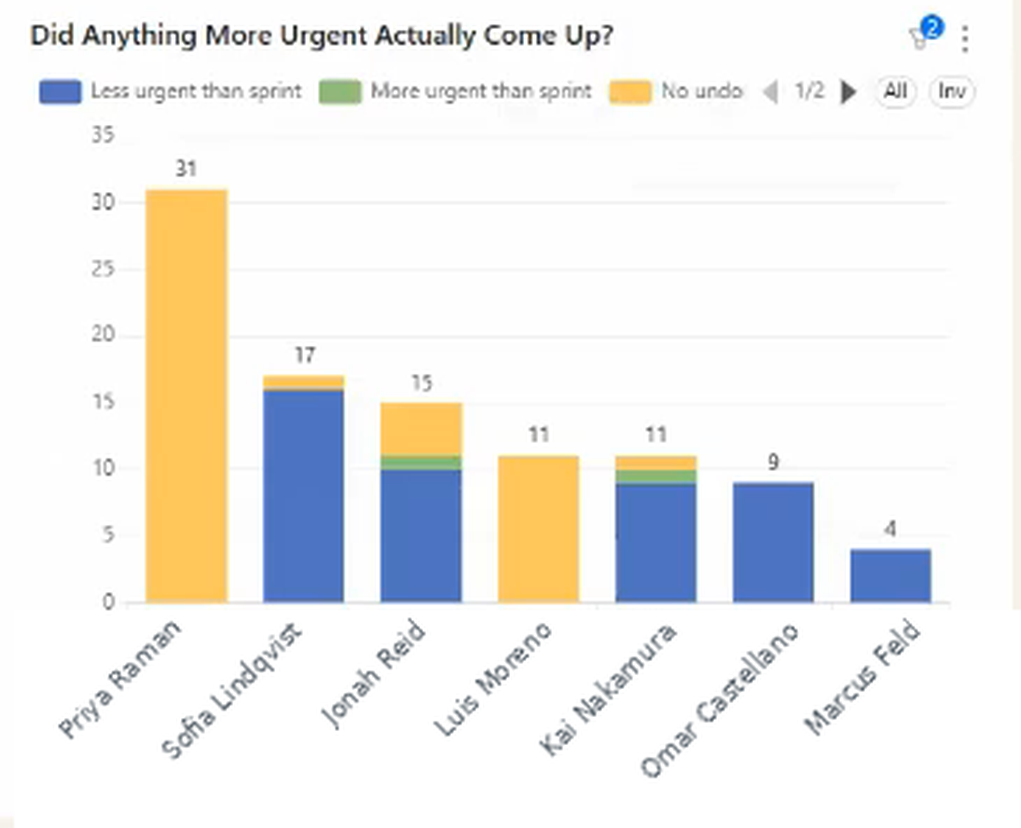
The team-level average hides the pattern, so the same comparison runs per person, classifying each piece of unplanned work as more urgent than the sprint work it displaced, less urgent, or displacing nothing at all.
Read the colours, not the heights. The tall bar on the left is almost entirely “no undone sprint work”, which is the healthy case: that person finished what they committed to and then did more. The blue segments are the ones to look at, because that’s unplanned work which displaced something more important. And the green slivers, the genuinely-more-urgent interruptions everyone assumes dominate, are barely visible.
That is a specific, uncomfortable, useful finding. It reframes the retro from “we got interrupted a lot” to “we got interrupted a lot, and most of it could have waited.” Those are different conversations with different fixes.
The hygiene it exposes
One side effect worth knowing: work with no priority assigned can’t be compared to anything, so it shows up as unclassified. A short list of untagged tasks each week keeps the rest of the numbers meaningful, and it’s usually a two-minute job.
Want to see how much of your sprint is actually going to unplanned work, and whether it was worth it? Book a call with Nathan and we’ll set it up against your sprint definition.
What to do with the answer
If the unplanned work was genuinely more urgent: your plan is too full. You’re committing to a sprint that assumes no interruptions, in a business that reliably produces them. Commit to less and hold the remainder as deliberate slack.
If it was less urgent: the plan isn’t being protected. This is rarely a motivation problem, it’s usually a routing one. Requests arrive directly to whoever can act on them, and there’s no step between arriving and being worked on. A single queue, checked once a day, fixes more of this than any amount of encouragement.
If one person absorbs most of it: you’ve found your shock absorber. It’s often the most senior or most helpful person on the team, and their own committed work is quietly paying for it. That shows up as their sprint tasks rolling week after week, which the sprint task view makes visible.
If the ratio is high but everything got done anyway: nothing is wrong except your estimates. The team is absorbing interruptions and still delivering, which means they’ve been sandbagging the sprint, and you could commit to more.
FAQ
Does Asana track unplanned work? No. Asana has no built-in concept of planned versus unplanned. You can approximate it with a sprint project, section or tag, and treat anything completed outside it as unplanned, but Asana won’t count or compare the two groups for you.
How do I know if unplanned work is a real problem? Counting it isn’t enough, because a high count can be perfectly healthy. The useful test is comparing the urgency of what got displaced against the urgency of what displaced it. Interruptions that were genuinely more important are a planning signal; interruptions that weren’t are a process signal.
What counts as unplanned work? Whatever wasn’t in the commitment at the start of the period. The definition is yours, and it only has to be applied consistently: work not in the sprint project, or not carrying the sprint tag, or added after the sprint start date.
Can I see unplanned work per person? Yes, and it’s usually where the insight is. Team averages hide the fact that interruptions rarely fall evenly, and the person absorbing most of them is often the one whose own committed work keeps slipping.
Isn’t some unplanned work unavoidable? Of course, and the goal isn’t zero. The goal is knowing the rate, so you can plan around it rather than being surprised by it every sprint.
Related reading: how to track sprint velocity in Asana, tracking historical sprint velocity, and the priority pyramid behind the urgency score.